




















Using Report Variables in Code
Our sample projects and report templates can help you learn the basics of working with our products.This example is outdated, you can check out the many other new examples in this category.This example shows the use variables (report parameters) in the web reports using POST (values are passed to the request using a form) and GET (values are passed in the URL request) methods. On the start page, there are several parameters in the form - for example, this is a simple user profile. After filling, these parameters are passed to the
On the
On the
In the screenshot below you can see the result of the sample code:
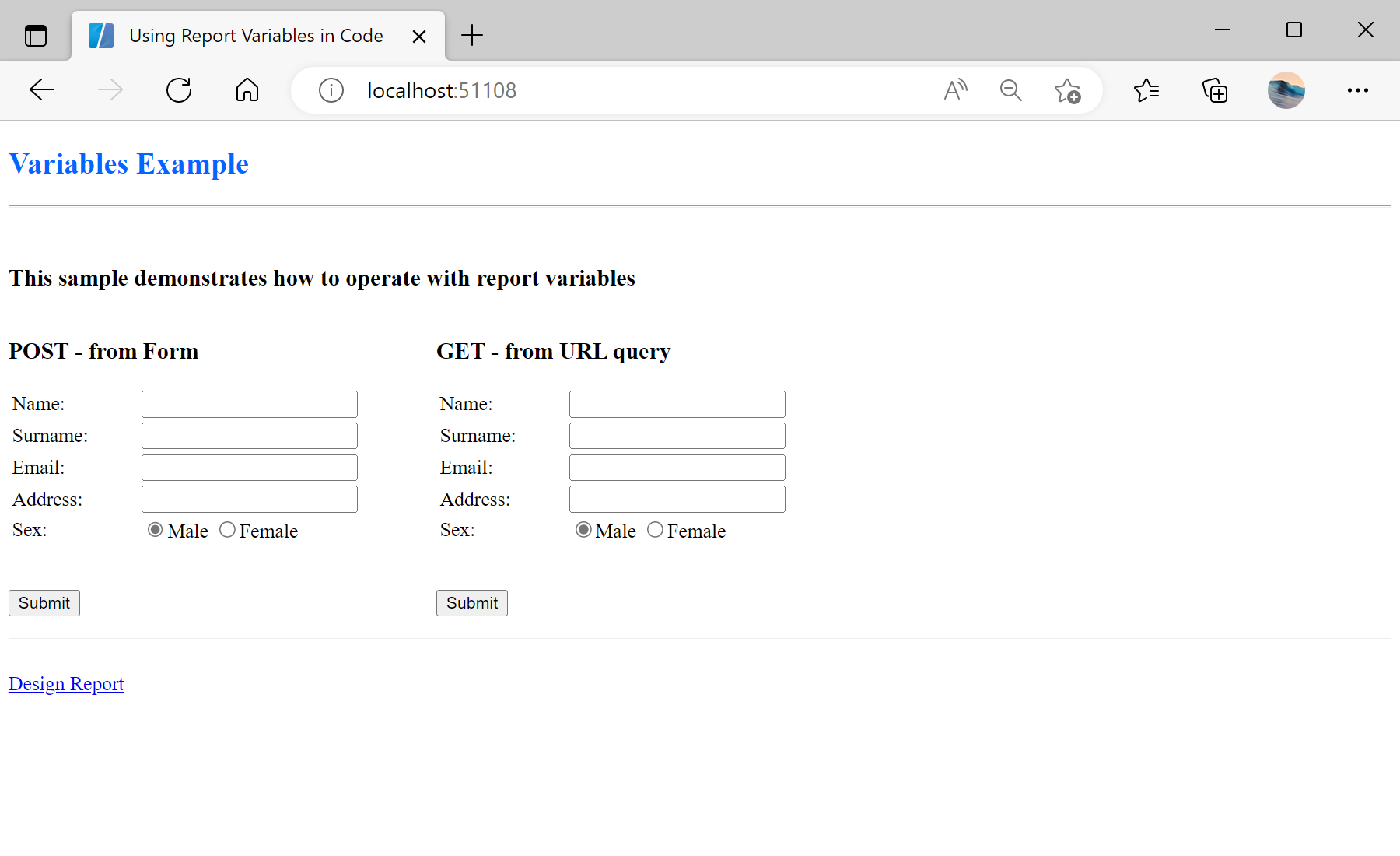
Default.aspx page:
<%@ Page Language="C#" AutoEventWireup="true" CodeBehind="Default.aspx.cs" Inherits="Using_Report_Variables_in_Code.Default" %>

<!DOCTYPE html>

<html xmlns="http://www.w3.org/1999/xhtml">
<head runat="server">
    <title>Using Report Variables in Code</title>
    <style>
        form {
            float: left;
            margin-right: 60px;
        }
        hr {
            clear: both;
        }
    </style>
</head>
<body>
    <h2><span style="color: #0066ff">Variables Example</span></h2>
    <hr />
    <br />
    <h3>This sample demonstrates how to operate with report variables</h3>
    <form id="form1" action="ReportPOST.aspx" method="post" >
        <h3>POST - from Form</h3>
        <table>
            <tr>
                <td style="width: 100px;"><label for="name">Name:</label></td>
                <td><input id="name1" type="text" name="name" /></td>
            </tr>
            <tr>
                <td><label for="surname">Surname:</label></td>
                <td><input id="surname1" type="text" name="surname" /></td>
            </tr>
            <tr>
                <td><label for="email">Email:</label></td>
                <td><input id="email1" type="text" name="email" /></td>
            </tr>
            <tr>
                <td><label for="address">Address:</label></td>
                <td><input id="address1" type="text" name="address" /></td>
            </tr>
            <tr>
                <td><label for="sex">Sex:</label></td>
                <td>
                    <input id="radio1m" type="radio" name="sex" value="true" checked="checked" /><label for="radio1m">Male</label>
                    <input id="radio1f" type="radio" name="sex" value="false" /><label for="radio1f">Female</label>
                </td>
            </tr>
        </table>
        <br />
        <p>
            <input id="submit1" type="submit" value="Submit" />
        </p>
    </form>
    <form id="form2" action="ReportGET.aspx" method="get" >
        <h3>GET - from URL query</h3>
        <table>
            <tr>
                <td style="width: 100px;"><label for="name">Name:</label></td>
                <td><input id="name2" type="text" name="name" /></td>
            </tr>
            <tr>
                <td><label for="surname">Surname:</label></td>
                <td><input id="surname2" type="text" name="surname" /></td>
            </tr>
            <tr>
                <td><label for="email">Email:</label></td>
                <td><input id="email2" type="text" name="email" /></td>
            </tr>
            <tr>
                <td><label for="address">Address:</label></td>
                <td><input id="address2" type="text" name="address" /></td>
            </tr>
            <tr>
                <td><label for="sex">Sex:</label></td>
                <td>
                    <input id="radio2m" type="radio" name="sex" value="true" checked="checked" /><label for="radio2m">Male</label>
                    <input id="radio2f" type="radio" name="sex" value="false" /><label for="radio2f">Female</label>
                </td>
            </tr>
        </table>
        <br />
        <p>
            <input id="submit2" type="submit" value="Submit" />
        </p>
    </form>
    <br />
    <hr />
    <br />
    <a href="/Design.aspx">Design Report</a>
</body>
</html>
On the
ReportPOST.aspx page in the Page_Load() event we assign the parameters values to the report using POST from form. The parameter name is the name of a variable in the dictionary of the report template:
protected void Page_Load(object sender, EventArgs e)
{
	StiWebViewer1.Report = report;
	var report = new StiReport();
	report.Load(Server.MapPath(@"Reports\Variables.mrt"));

	report.Compile();

	report["Name"] = Request.Form["name"] ?? string.Empty;
	report["Surname"] = Request.Form["surname"] ?? string.Empty;
	report["Email"] = Request.Form["email"] ?? string.Empty;
	report["Address"] = Request.Form["address"] ?? string.Empty;
	report["Sex"] = Request.Form["sex"] != null && Convert.ToBoolean(Request.Form["sex"]);

	StiWebViewer1.Report = report;
}
On the
ReportGET.aspx page in the Page_Load() event we assign the parameters values to the report using GET from URL:
protected void Page_Load(object sender, EventArgs e)
{
	var report = new StiReport();
	report.Load(Server.MapPath(@"Reports\Variables.mrt"));

	StiWebViewer1.Report = report;
}
In the screenshot below you can see the result of the sample code: