Cloud
Cloud-Dienstleistung für schnelle und effektive Analyse und Visualisierung von Daten für Ihr Business ohne eigene Applikationen zu erstellen oder zu programmieren.
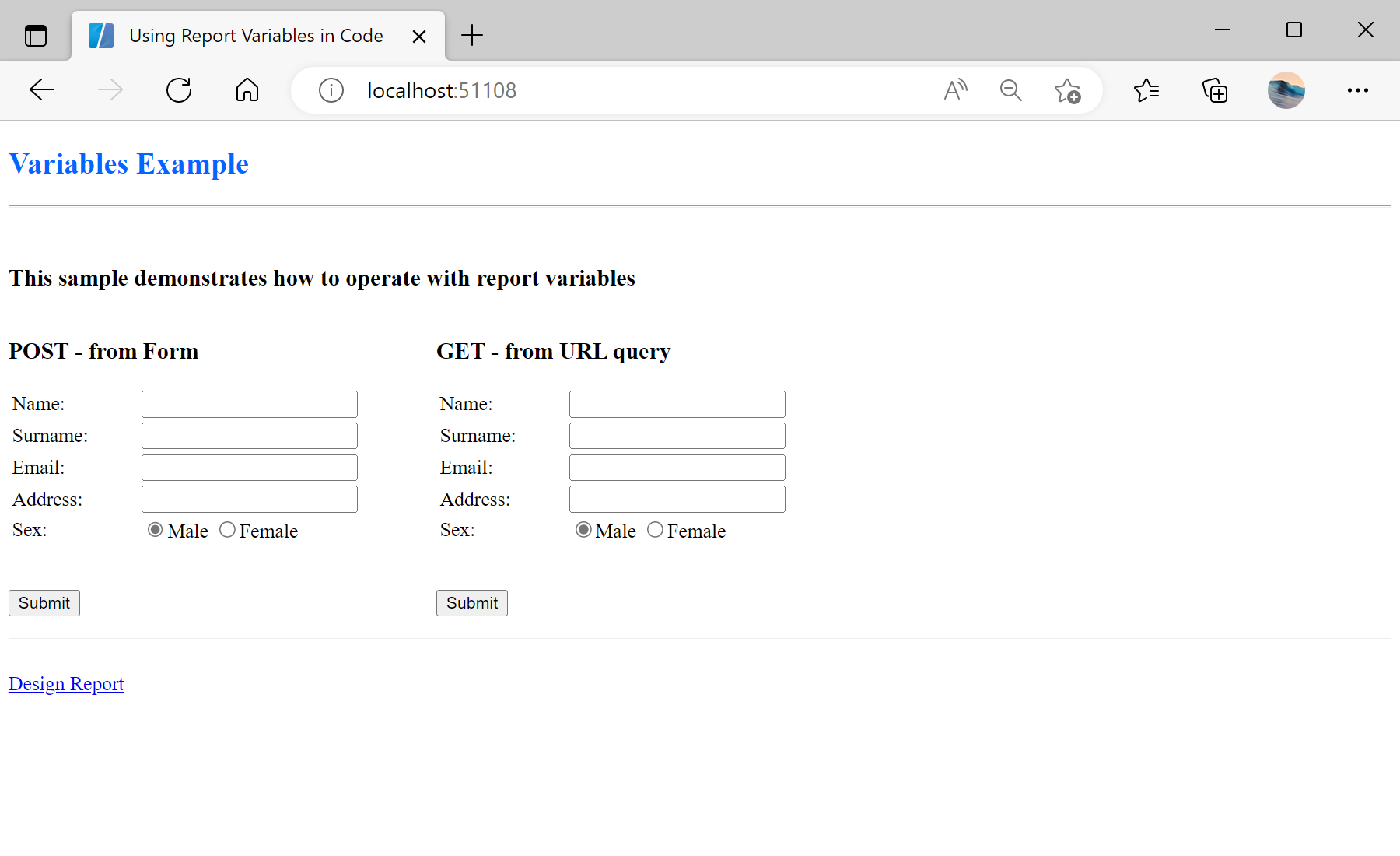
Default.aspx page:
<%@ Page Language="C#" AutoEventWireup="true" CodeBehind="Default.aspx.cs" Inherits="Using_Report_Variables_in_Code.Default" %>

<!DOCTYPE html>

<html xmlns="http://www.w3.org/1999/xhtml">
<head runat="server">
    <title>Using Report Variables in Code</title>
    <style>
        form {
            float: left;
            margin-right: 60px;
        }
        hr {
            clear: both;
        }
    </style>
</head>
<body>
    <h2><span style="color: #0066ff">Variables Example</span></h2>
    <hr />
    <br />
    <h3>This sample demonstrates how to operate with report variables</h3>
    <form id="form1" action="ReportPOST.aspx" method="post" >
        <h3>POST - from Form</h3>
        <table>
            <tr>
                <td style="width: 100px;"><label for="name">Name:</label></td>
                <td><input id="name1" type="text" name="name" /></td>
            </tr>
            <tr>
                <td><label for="surname">Surname:</label></td>
                <td><input id="surname1" type="text" name="surname" /></td>
            </tr>
            <tr>
                <td><label for="email">Email:</label></td>
                <td><input id="email1" type="text" name="email" /></td>
            </tr>
            <tr>
                <td><label for="address">Address:</label></td>
                <td><input id="address1" type="text" name="address" /></td>
            </tr>
            <tr>
                <td><label for="sex">Sex:</label></td>
                <td>
                    <input id="radio1m" type="radio" name="sex" value="true" checked="checked" /><label for="radio1m">Male</label>
                    <input id="radio1f" type="radio" name="sex" value="false" /><label for="radio1f">Female</label>
                </td>
            </tr>
        </table>
        <br />
        <p>
            <input id="submit1" type="submit" value="Submit" />
        </p>
    </form>
    <form id="form2" action="ReportGET.aspx" method="get" >
        <h3>GET - from URL query</h3>
        <table>
            <tr>
                <td style="width: 100px;"><label for="name">Name:</label></td>
                <td><input id="name2" type="text" name="name" /></td>
            </tr>
            <tr>
                <td><label for="surname">Surname:</label></td>
                <td><input id="surname2" type="text" name="surname" /></td>
            </tr>
            <tr>
                <td><label for="email">Email:</label></td>
                <td><input id="email2" type="text" name="email" /></td>
            </tr>
            <tr>
                <td><label for="address">Address:</label></td>
                <td><input id="address2" type="text" name="address" /></td>
            </tr>
            <tr>
                <td><label for="sex">Sex:</label></td>
                <td>
                    <input id="radio2m" type="radio" name="sex" value="true" checked="checked" /><label for="radio2m">Male</label>
                    <input id="radio2f" type="radio" name="sex" value="false" /><label for="radio2f">Female</label>
                </td>
            </tr>
        </table>
        <br />
        <p>
            <input id="submit2" type="submit" value="Submit" />
        </p>
    </form>
    <br />
    <hr />
    <br />
    <a href="/Design.aspx">Design Report</a>
</body>
</html>ReportPOST.aspx page in the Page_Load() event we assign the parameters values to the report using POST from form. The parameter name is the name of a variable in the dictionary of the report template:
protected void Page_Load(object sender, EventArgs e)
{
	StiWebViewer1.Report = report;
	var report = new StiReport();
	report.Load(Server.MapPath(@"Reports\Variables.mrt"));

	report.Compile();

	report["Name"] = Request.Form["name"] ?? string.Empty;
	report["Surname"] = Request.Form["surname"] ?? string.Empty;
	report["Email"] = Request.Form["email"] ?? string.Empty;
	report["Address"] = Request.Form["address"] ?? string.Empty;
	report["Sex"] = Request.Form["sex"] != null && Convert.ToBoolean(Request.Form["sex"]);

	StiWebViewer1.Report = report;
}ReportGET.aspx page in the Page_Load() event we assign the parameters values to the report using GET from URL:
protected void Page_Load(object sender, EventArgs e)
{
	var report = new StiReport();
	report.Load(Server.MapPath(@"Reports\Variables.mrt"));

	StiWebViewer1.Report = report;
}