





















Migration von Crystal Reports-Produkten zu den Stimulsoft-Reporting-Tools
Erstellen und Verwaltung vom Reporting fordert im jeden Business-Bereich die flexiblen und gleichzeitig leistungsfähigen Tools für die Arbeit mit Daten. Stimulsoft Reports ist die Produktpalette für Erstellen von Berichten aufgrund beliebter Datenbanken mit breiten Möglichkeiten der Analyse und Visualisierung der Daten.Vorteile der Migration von Crystal Reports zu Stimulsoft
 Moderne und intuitiv verständliche Benutzeroberfläche
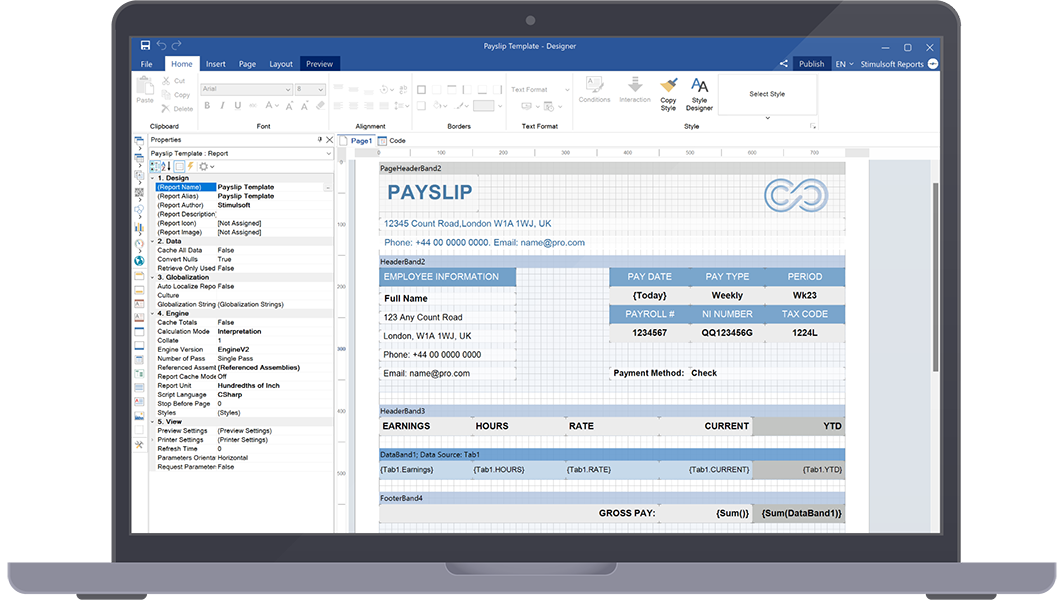
Stimulsoft bietet moderne und verständliche Schnittstelle, die die Navigation und Berichtserstellung im Vergleich mit alter Crystal-Reports-Schnittstelle vereinfacht.
 Migrationsprozess
Der Berichtsgenerator Stimulsoft stellt reibungslose Migration sicher und erlaubt den Benutzern existierte Crystal-Reports-Projekte in Stimulsoft-Reports-Format ohne Verlust von der Funktionalität oder Daten umzuwandeln.
 Leistungsfähiger Berichtsdesigner
Stimulsoft bietet eine breite Auswahl von verbesserten Tools, die einfach visuell attraktive und dynamische Berichte zu erstellen erlauben. Unter anderem, sind die „Drag-and-drop“-Möglichkeit, erweiterte Formatierung-Parameter und breite Fähigkeiten der Einstellung verfügbar.
 Plattformübergreifende Kompatibilität
Stimulsoft Reports unterstützt viele Plattformen wie Windows, macOS und Linux, was den Zugriff zu Ihren Berichten und die Arbeit mit diesen Berichten unter verschiedenen Betriebssystemen gewährleistet.
 Dynamische Generation von Berichten
Stimulsoft ermöglicht die dynamische Generation von Berichten und erlaubt den Benutzern die Parameter der Dokumente festzulegen, die Filterung anzuwenden und die Berichte während der Laufzeit zu erstellen. Es versichert mehr interaktive und personalisierte Erfahrung des Erstellens von Berichten für Endbenutzer.
 Umfassende Unterstützung und Gemeinschaft
Stimulsoft bietet umfangreichen Support-Service, einschließlich Dokumentation, Anleitungen und das Forum mit aktiven Benutzern, wo man die Hilfe erhalten und die Kenntnisse teilen kann. Es garantiert, dass die Kunden immer den Zugang zu den Ressourcen und der Hilfe, wenn es nötig wird, haben.
 Breite interaktive Möglichkeiten
Stimulsoft Reports bietet viele interaktive Funktionen, zum Beispiel, interaktive Sortierung, die Detaillierung-Funktionalität und interaktive Elemente in den Berichten. Es verbessert das Engagement mit dem Benutzer und erlaubt die Daten tiefer zu erlernen.
 Viele Exportformate
Die Stimulsoft-Softwares enthalten die Möglichkeit, fertige Dokumente in verschiedene Formate zu exportieren: PDF mit digitaler Unterschrift, Excel, Word, Bilderformate wie PNG und JPEG, und viele andere.
Stimulsoft Demo

Designer-App zum Erstellen von Berichten
Konvertieren Sie Ihre Crystal Reports
Was kommt als Nächstes?
Wir haben viele Berichts- und Dashboards-Vorlagen, die nach den Verwendungsbereichen gruppiert werden, vorbereitet. Sie können Ihre Daten verbinden und nach Ihren Erfordernissen ändern. Unsere Benutzer-Anleitungen und technische Dokumentation helfen Ihnen die Daten-Analytik und Visualisierung schneller und mehr effizient zu machen. Außerdem, Sie können die Schulungen mit unseren Fachleuten bestellen und unseren YouTube-Kanal abonnieren, um immer aktuellste Videos zu erhalten.
Schulungen
Stehen Sie vor den Schwierigkeiten? Kein Problem!
Videostunden
Wir haben viele Videomaterials über Entwickeln von Berichten und Dashboards vorbereitet. Alle Anleitungen sind nach spezifischen Themen gruppiert und werden regelmäßig aktualisiert und ergänzt.
Dokumentation
Die Dokumentation beschreibt ausführlich sowohl die allgemeinen Möglichkeiten der Software, als auch die Besonderheiten der Einstellungen der Berichtskomponenten.