























Stimulsoft Reports
Reporting tool for Vue.js
Embeddable components for creating, viewing, and exporting reports in applications built with the Vue.js framework. Compatible with Vue 3+ and .NET Core 6/8/10. The report generator is built with Vue's architecture in mind, ensuring seamless integration with your project.Reporting for Vue.js projects
Design professional reports and dashboards directly in your Vue applications. The Stimulsoft report generator provides all the tools you need for data visualization and document styling. Built‑in interactive components make working with reports convenient and intuitive for end users.Loading...
Installation and Quick Start
Install the required npm packages in just a couple of minutes and add just a few lines of code to integrate the report generator into your Vue.js project. The components are fully ready to use, support Vue 3+, and can be configured through familiar mechanisms — props, events, and slots. Start creating reports right away without spending time on complex setup. bash
npm install stimulsoft-viewer-vue
dotnet add package Stimulsoft.Reports.VueInteractive Report Display
Embed ready-made reports into your Vue.js application using a dedicated viewer component. It fully supports interactivity, updating content when data changes, and is easily controlled through parameters and events. The built-in viewer seamlessly fits into the application interface and provides users with all the necessary tools for working with reports. App.vue
<script setup lang="ts">
import { StimulsoftViewer } from 'stimulsoft-viewer-vue';
</script>

<template>
    <StimulsoftViewer
        request-url="/Viewer/{action}"
        action="InitViewer"
        height="100vh"
    />
</template>
Report Export & Conversion
Export ready-made reports to the most popular formats: PDF, Excel, Word, HTML, CSV, JSON, XML, and others. The export functionality is available directly from your Vue application through the built‑in component API. Customize export settings, preserve document structure and styling — the result always meets your requirements. App.vue
<script setup lang="ts">
import { ref } from 'vue';
import { StimulsoftViewer } from 'stimulsoft-viewer-vue';
import type { StimulsoftViewerHandle } from 'stimulsoft-viewer-vue';

const viewerRef = ref<StimulsoftViewerHandle | null>(null);

const exportToPdf = () => {
    if (viewerRef.value)
        viewerRef.value.export('Pdf', { ImageResolution: 200 });
};
</script>

<template>
        <input type="button" @click="exportToPdf" value="Export to PDF" />
</template>


Server‑Side Report Processing on ASP.NET
The server‑side part of the report generator for Vue.js runs on the ASP.NET platform. All resource‑intensive processes — template loading, rendering, data preparation, and export — are handled on the server. This reduces the load on the client side of Vue applications and speeds up work with reports. The server component is easily integrated via standard APIs and is compatible with .NET 6, 8, 10, and newer, ensuring stability in any project. ViewerController.cs
using Microsoft.AspNetCore.Mvc;
using Stimulsoft.Report;
using Stimulsoft.Report.Vue;

[Controller]
public class ViewerController : Controller
{

    [HttpPost]
    public IActionResult InitViewer()
    {
        var requestParams = StiVueViewer.GetRequestParams(this);

        var options = new StiVueViewerOptions();
        options.Actions.GetReport = "GetReport";
        options.Actions.ViewerEvent = "ViewerEvent";

        return StiVueViewer.ViewerDataResult(requestParams, options);
    }

    [HttpPost]
    public IActionResult GetReport()
    {
        var report = StiReport.CreateNewReport();
        var path = StiVueHelper.MapPath(this, "Reports/MasterDetail.mrt");
        report.Load(path);

        return StiVueViewer.GetReportResult(this, report);
    }
}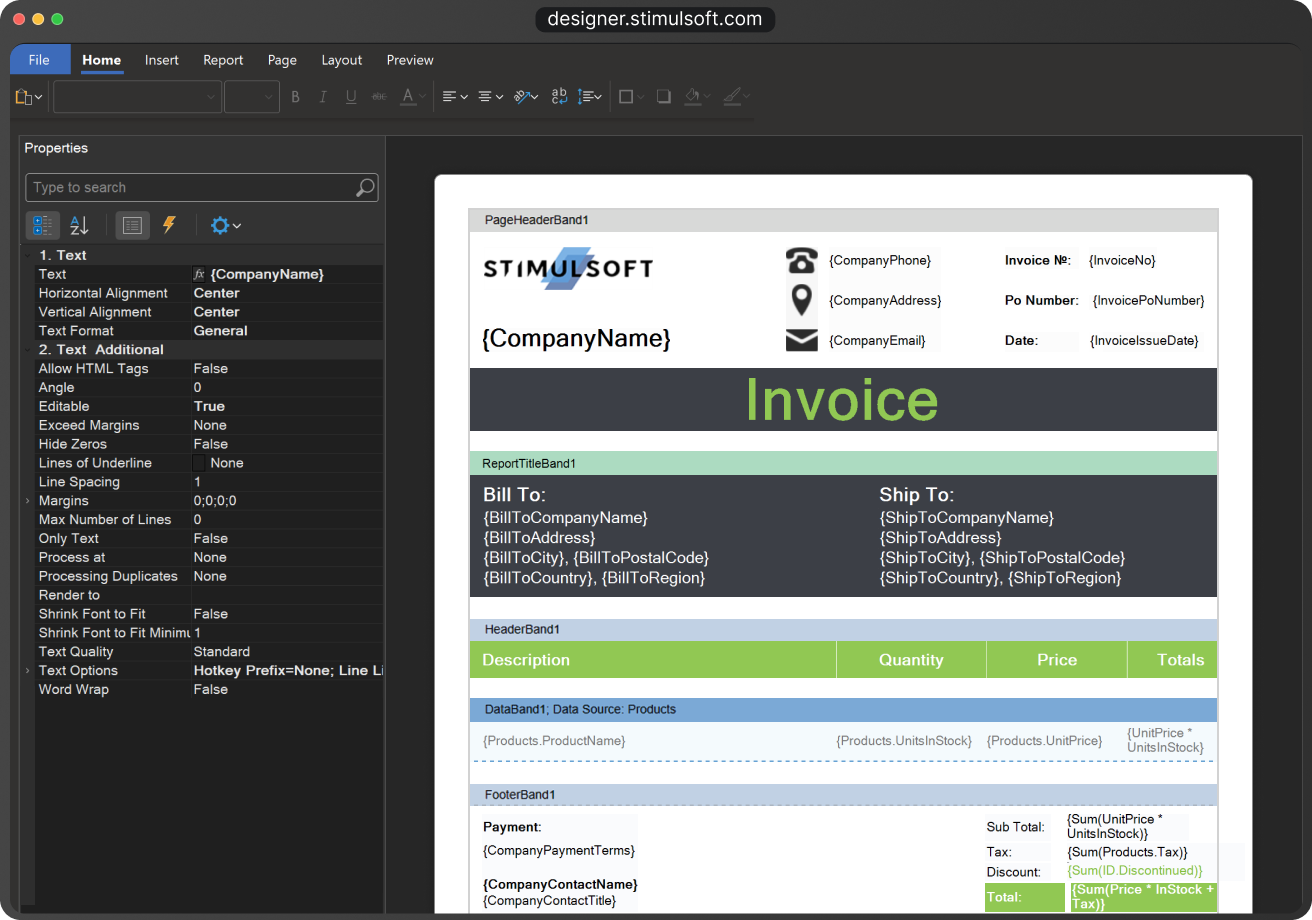
Designer for Creating Reports, Dashboards, and Forms
The Stimulsoft Designer is the primary tool for visually designing reporting in Vue applications. Connect data from any source – SQL, NoSQL, cloud storage, file systems, and more.Use over 80 chart types, including 3D visualization, built‑in barcodes, interactive elements, events, and much more. The Designer can run as a standalone desktop application, be embedded into your Vue app, or launch directly in the browser.


Stimulsoft
Reports.WEB
Stimulsoft Reports for Vue.js is a part of the Stimulsoft Reports.WEB product, a cross-platform set of tools for report creation using ASP.NET, ASP.NET MVC, Angular, Blazor, React, and Vue.js technologies. It includes a powerful and rapid report engine using a universal .NET platform, a simple and convenient report designer, and an interactive report viewer.What's next?
We have prepared hundreds of reports and dashboards templates grouped by spheres of use. You can immediately use them by connecting your data or change according to your requirements. Our lessons and technical documentation will help make your work effective! Moreover, you can request the training courses from our technical specialists, subscribe to our YouTube channel to always get new videos, and receive all your answers in our online documentation.
Training courses
Are you faced with difficulties when creating reports and dashboards? This is not a problem!
Video lessons
We have prepared many video materials for the designing reports and dashboards. All tutorials are grouped by specific topics and regularly updated and supplemented.
Documentation
Our online user guides describe both the general functionality of the product and provide advice and suggestions for the report design and hints of setting components for reporting.