




















Localizing the Viewer
Our sample projects and report templates can help you learn the basics of working with our products.This example is outdated, you can check out the many other new examples in this category.This sample project shows how to localize the HTML5 viewer. To select localization is enough to set the localization name or path to the localization XML file as the value of the
In the example below we added a list of the localizations. All the XML files are in the
The
In the screenshot below you can see the result of the sample code:
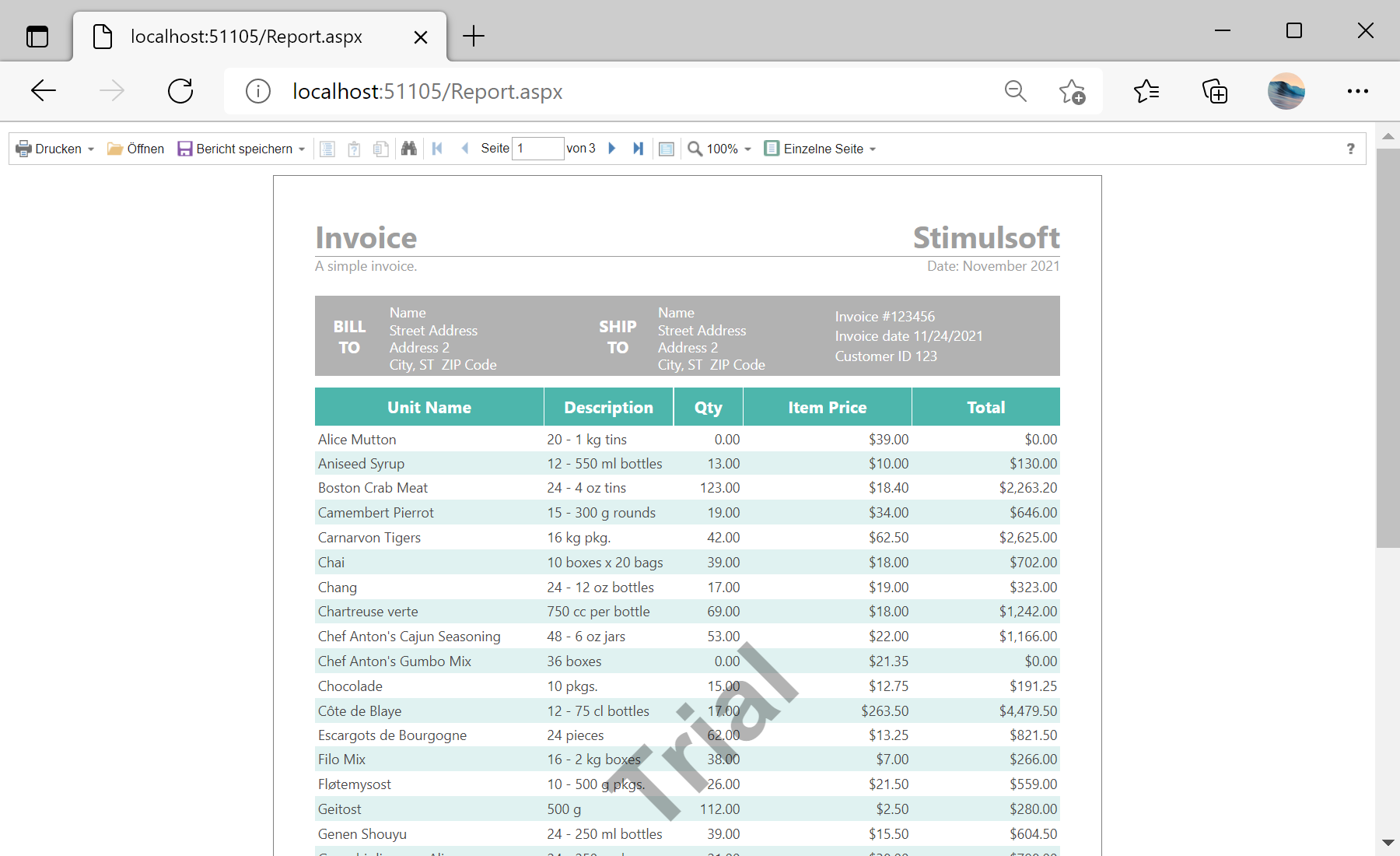
Localization property. This can be done on an ASPX page or in the Page_Load() event:
<cc1:StiWebViewer ID="StiWebViewer1" runat="server" Localization="en" />protected void Page_Load(object sender, EventArgs e)
{
StiWebViewer1.Localization = "en";
//StiWebViewer1.Localization = "Localization/en.xml";
}In the example below we added a list of the localizations. All the XML files are in the
Localization folder of the Web project. After selecting you can display the viewer with the specified localization:
<%@ Page Language="C#" AutoEventWireup="true" CodeBehind="Default.aspx.cs" Inherits="Localizing_the_Viewer.Default" %>

<!DOCTYPE html>
<html xmlns="http://www.w3.org/1999/xhtml">
<head runat="server">
	<title>Localizing the Viewer</title>
</head>
<body>
	<form id="form1" runat="server">
	<div>
		<h2><span style="color: #0066ff">Localizing Viewer Example</span></h2>
		<h3>This sample demonstrates how to localize the report viewer</h3>
		<asp:DropDownList ID="DropDownListLang" runat="server">
			<asp:ListItem Value="ar">Arabic</asp:ListItem>
			<asp:ListItem Value="be">Belarusian</asp:ListItem>
			<asp:ListItem Value="bg">Bulgarian</asp:ListItem>
			<asp:ListItem Value="ca-ES">Catalan</asp:ListItem>
			<asp:ListItem Value="cs">Czech</asp:ListItem>
			<asp:ListItem Value="de">Deutsch</asp:ListItem>
			<asp:ListItem Value="el-GR">Greek</asp:ListItem>
			<asp:ListItem Value="en-GB">English (UK)</asp:ListItem>
			<asp:ListItem Value="en" Selected="True">English</asp:ListItem>
			<asp:ListItem Value="es">Spanish</asp:ListItem>
			<asp:ListItem Value="eu-ES">Basque</asp:ListItem>
			<asp:ListItem Value="fa">Farsi</asp:ListItem>
			<asp:ListItem Value="fr">French</asp:ListItem>
			<asp:ListItem Value="gl-ES">Galician</asp:ListItem>
			<asp:ListItem Value="hr">Croatian</asp:ListItem>
			<asp:ListItem Value="hu">Hungarian</asp:ListItem>
			<asp:ListItem Value="id">Indonesian</asp:ListItem>
			<asp:ListItem Value="it">Italian</asp:ListItem>
			<asp:ListItem Value="ka">Georgian</asp:ListItem>
			<asp:ListItem Value="Lt-sr-SP">Serbian (Latin)</asp:ListItem>
			<asp:ListItem Value="lt">Lithuanian</asp:ListItem>
			<asp:ListItem Value="nb-NO">Norwegian (Bokmål)</asp:ListItem>
			<asp:ListItem Value="nl">Dutch</asp:ListItem>
			<asp:ListItem Value="pl">Polish</asp:ListItem>
			<asp:ListItem Value="pt-BR">Portugese (Brazil)</asp:ListItem>
			<asp:ListItem Value="pt">Portuguese</asp:ListItem>
			<asp:ListItem Value="ro">Romanian</asp:ListItem>
			<asp:ListItem Value="ru">Russian</asp:ListItem>
			<asp:ListItem Value="sk">Slovak</asp:ListItem>
			<asp:ListItem Value="sv">Swedish</asp:ListItem>
			<asp:ListItem Value="tr">Turkish</asp:ListItem>
			<asp:ListItem Value="ua">Ukrainian</asp:ListItem>
			<asp:ListItem Value="zh-CHS">Chinese (Simplified)</asp:ListItem>
			<asp:ListItem Value="zh-CHT">Chinese (Traditional)</asp:ListItem>
		</asp:DropDownList>
		<asp:Button ID="ButtonShowReport" runat="server" Text="Show Report" onclick="ButtonShowReport_Click" />
	</div>
	</form>
</body>
</html>
The
ButtonShowReport_Click() event redirects to the Report.aspx page. On this page, in the Page_Load() event loads the report and data for it, then applies the selected localization to the viewer:
protected void Page_Load(object sender, EventArgs e)
{
	var report = new StiReport();
	report.Load(Server.MapPath("Reports\\Invoice.mrt"));

	StiWebViewer1.Localization = $"Localization/{Session["lang"]}.xml";
	StiWebViewer1.Report = report;
}
In the screenshot below you can see the result of the sample code: