




















Connecting to Data from Code
Our sample projects and report templates can help you learn the basics of working with our products.Reports are usually bound to data at design time, but you can also supply the data entirely from code.
Registering data. Load the report template, clear any design-time connections, and register your own data source under a name that matches the data references in the template:
The data itself can come from anywhere — here it is read from an XML file and its schema:
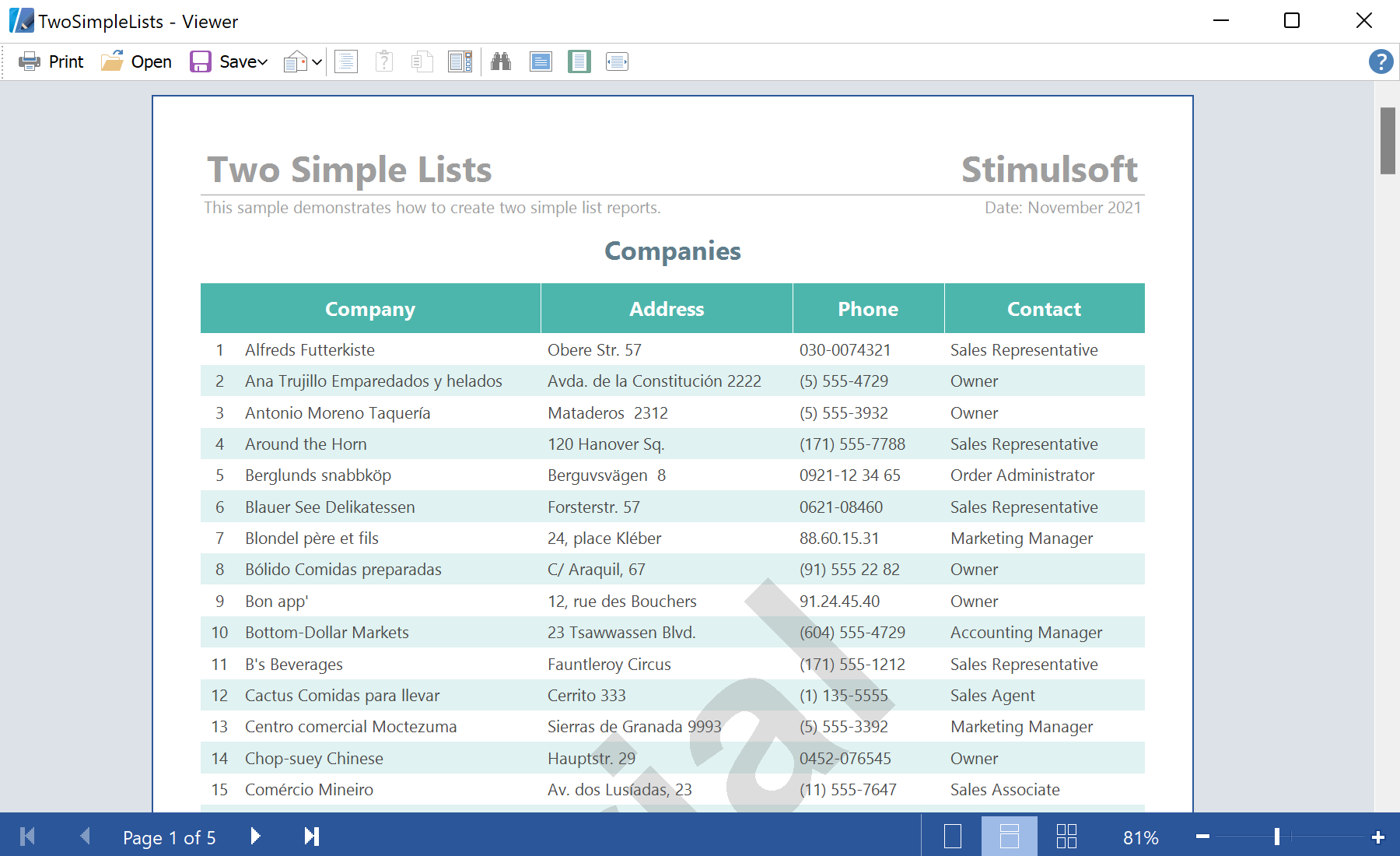
In the screenshot below you can see the result of the sample code:
Registering data. Load the report template, clear any design-time connections, and register your own data source under a name that matches the data references in the template:
private void ShowReport(DataSet dataSet)
{
    var report = new StiReport();
    report.Load(@"Reports\TwoSimpleLists.mrt");
    report.Dictionary.Databases.Clear();
    report.RegData("Demo", dataSet);
    report.Show();
}
The data itself can come from anywhere — here it is read from an XML file and its schema:
var dataSet = new DataSet();
dataSet.ReadXmlSchema(@"Data\Demo.xsd");
dataSet.ReadXml(@"Data\Demo.xml");
ShowReport(dataSet);
RegData makes the object available to the report engine; Dictionary.Databases.Clear() removes the connections stored in the template so that only your run-time data is used.In the screenshot below you can see the result of the sample code: