























Stimulsoft Reports
Reporting tool for Blazor
Reporting tool created for integration in applications, which works using the Blazor framework. The components support all the main capabilities of Blazor and can work both on the server-side and the client-side with the use of WebAssembly technology.Professional reports for Blazor apps
We offer dozens of professional report templates tailored to different business scenarios. Check out the variety of electronic documents you can produce using our software.Loading...
Quick installation
Start working in just a couple of minutes - use a single command to install the packages via NuGet, and immediately integrate our Blazor report generator into your project. bash
dotnet add package Stimulsoft.Reports.BlazorHow to integrate
Our Blazor report builder is created for simple and rapid integration of reporting components to Blazor projects. Visual part is placed on the Razor page, and all events are processed using C# code and the .NET framework.Publish Wizard
We have created a special functionality for rapid and simple integration of a report to a project – Publish Wizard. It allows you to integrate a ready-made report into any project in just a few clicks.<StiBlazorViewer Report="@report" />
@code
{
private StiReport report;
protected override void OnInitialized()
{
report = StiReport.CreateNewReport();
report.Load("Reports/Report.mrt");
base.OnInitialized();
}
}<StiBlazorViewer Report="@report" />
@code
{
private StiReport report;
protected override async Task OnInitializedAsync()
{
report = StiReport.CreateNewReport();
var bytes = await Http.GetByteArrayAsync("reports/Report.mrt");
report.Load(bytes);
await base.OnInitializedAsync();
}
}How to use Stimulsoft platform in Blazor app
The main feature of the Blazor framework is the use of universal .NET libraries that can run both on the server side and entirely on the client side using WebAssembly technology. Our components are designed with the differences and specifics of the Blazor Server and Blazor WASM platforms in mind. For working with reports, you can use familiar development environments and C# code. Easy switching between client-server and fully client-side technologies is supported, as well as both deployment modes. The viewer and report designer include a full set of events for comprehensive reporting functionality.
Blazor Server
In Blazor Server, all logic runs on the server, while the browser is just a screen. Every user action sends a real-time signal over SignalR to the server, which processes the code and sends back UI updates.
Blazor WebAssembly
In Blazor WebAssembly, the app downloads and runs inside the browser. Your code runs directly on the user's device via WASM, handling events locally without needing a constant server connection.Report export
With our product, you export data in over 20 formats – PDF, Excel, Word, HTML, images, and more – straight from the app interface. You have full flexibility over the available formats and export settings: hide options you don't need or set your own defaults. You can also export programmatically, automatically sending data to the server or browser in any format. Index.razor
private void OnClickExport()
{
  StiBlazorHelper.Initialize(JSRuntime);

  report = StiReport.CreateNewReport();
  report.Load("Reports/Report.mrt");

  StiReportResponse.ResponseAsPdf(report);
}


Report designer: desktop and online
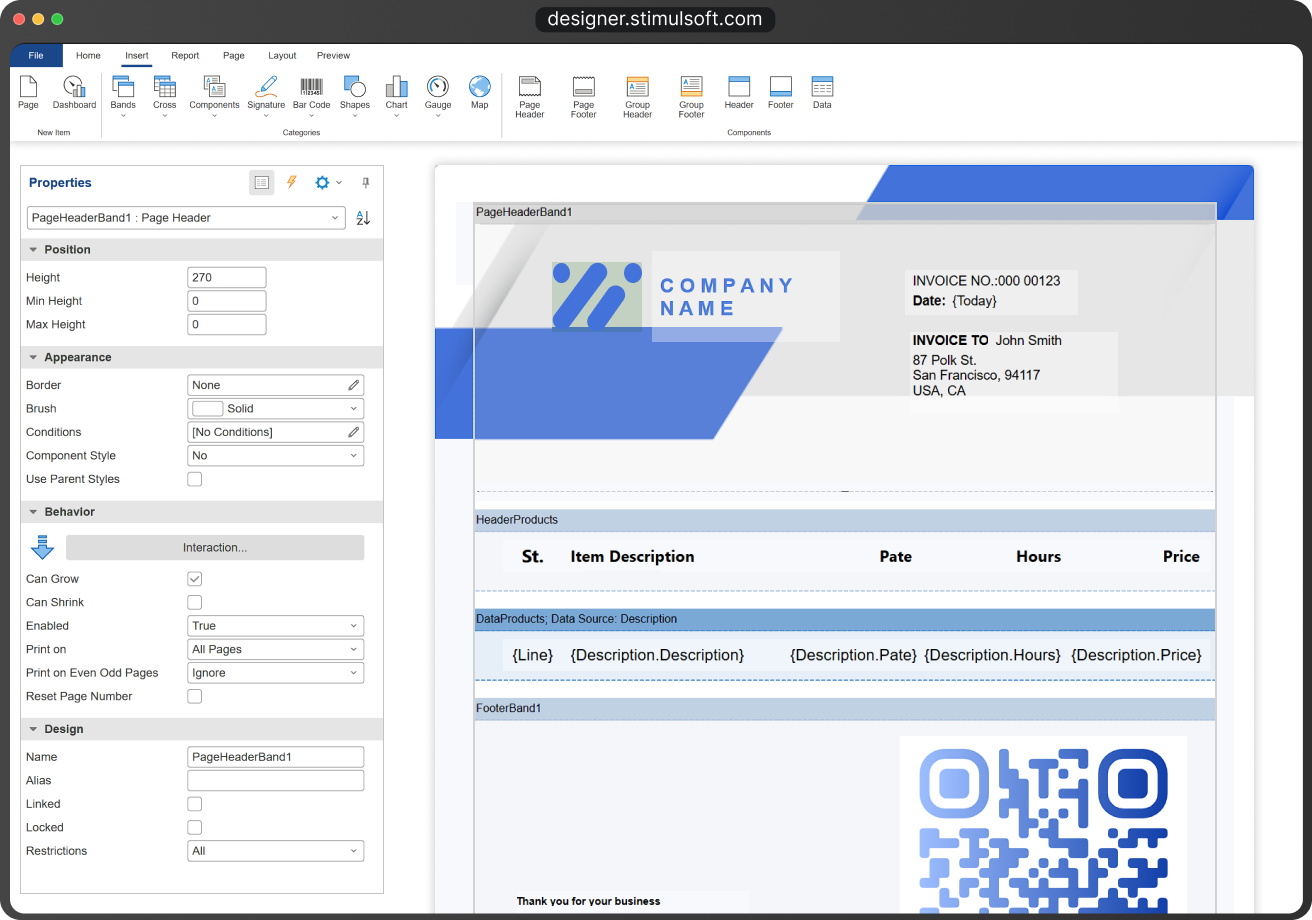
To get started, you will need the report designer – an application for creating reports and dashboards. The designer supports connections to data from any sources – SQL, JSON, XML, and others. The interface is fully customizable: you can switch UI themes, use localization in over 40 languages, and flexibly handle all component events.The report designer is available as a desktop application for Windows, macOS, and Linux, as well as an online version at designer.stimulsoft.com.


Stimulsoft
Reports.WEB
Stimulsoft Reports for Blazor is a part of the Stimulsoft Reports.WEB product, a cross-platform set of tools for report creation using ASP.NET, ASP.NET MVC, .NET, Angular, Blazor, React, and Vue.js technologies. It includes a powerful report engine using a universal .NET platform, a simple and convenient report designer, and an interactive report viewer.What's next?
We have prepared hundreds of reports and dashboards templates grouped by spheres of use. You can immediately use them by connecting your data or change according to your requirements. Our lessons and technical documentation will help make your work effective! Moreover, you can request the training courses from our technical specialists, subscribe to our YouTube channel to always get new videos, and receive all your answers in our online documentation.
Training courses
Are you faced with difficulties when creating reports and dashboards? This is not a problem!
Video lessons
We have prepared many video materials for the designing reports and dashboards. All tutorials are grouped by specific topics and regularly updated and supplemented.
Documentation
Our online user guides describe both the general functionality of the product and provide advice and suggestions for the report design and hints of setting components for reporting.