
















This example shows how to edit a report template in the Stimulsoft Designer for PHP using JavaScript with server-side data processing.

First, you need to include the Stimulsoft libraries using Composer. This allows you to use the required classes for handling server-side events:
<?php
require_once '../vendor/autoload.php';

use Stimulsoft\Events\StiDataEventArgs;
use Stimulsoft\StiHandler;


...

Next, create and configure an event handler object. By default, all requests are processed on the current page, but you can also specify a separate handler file if required:
$handler = new StiHandler();
// $handler = new StiHandler('handler.php');

Then, define the onBeginProcessData event. This event is triggered when the designer requests data for a report. The logic inside this event is executed on the server side:
$handler->onBeginProcessData = function (StiDataEventArgs $args) {

};

After defining the events, process the incoming request. If the request is related to data processing, the result will be returned immediately:
$handler->process();

Next, create the HTML page structure and include the JavaScript files required for the Viewer, Designer, and Blockly editor to work properly:
<script src="/../vendor/stimulsoft/reports-php/scripts/stimulsoft.reports.js"></script>
<script src="/../vendor/stimulsoft/reports-php/scripts/stimulsoft.viewer.js"></script>
<script src="/../vendor/stimulsoft/reports-php/scripts/stimulsoft.designer.js"></script>
<script src="/../vendor/stimulsoft/reports-php/scripts/stimulsoft.blockly.editor.js"></script>

Then, render the JavaScript code required for the server-side handler. This enables communication between the client-side designer and the server:
<?php
$handler->renderHtml();
?>

Next, create and configure the Designer options object and enable full-screen mode:
let options = new Stimulsoft.Designer.StiDesignerOptions();
options.appearance.fullScreenMode = true;

Then, create the Designer object and define the client-side event that sends data processing requests to the server-side handler:
let designer = new Stimulsoft.Designer.StiDesigner(options, "StiDesigner", false);

designer.onBeginProcessData = function (args, callback) {
    Stimulsoft.handler.process(args, callback);
};

Next, create a Report object and load a report template file. The report is loaded on the client side using JavaScript:
let report = new Stimulsoft.Report.StiReport();
report.loadFile("../reports/SimpleList.mrt");
designer.report = report;

Finally, render the designer into the specified HTML container when the page is loaded:
function onLoad() {
    designer.renderHtml("designerContent");
}
<body onload="onLoad();">
    <div id="designerContent"></div>
</body>

As a result, the report template is opened in the browser-based designer, where it can be edited interactively. All data processing requests are handled securely on the server side through the configured event handler, providing a flexible and powerful way to customize reports directly in a web application.
In the screenshot below you can see the result of the sample code:
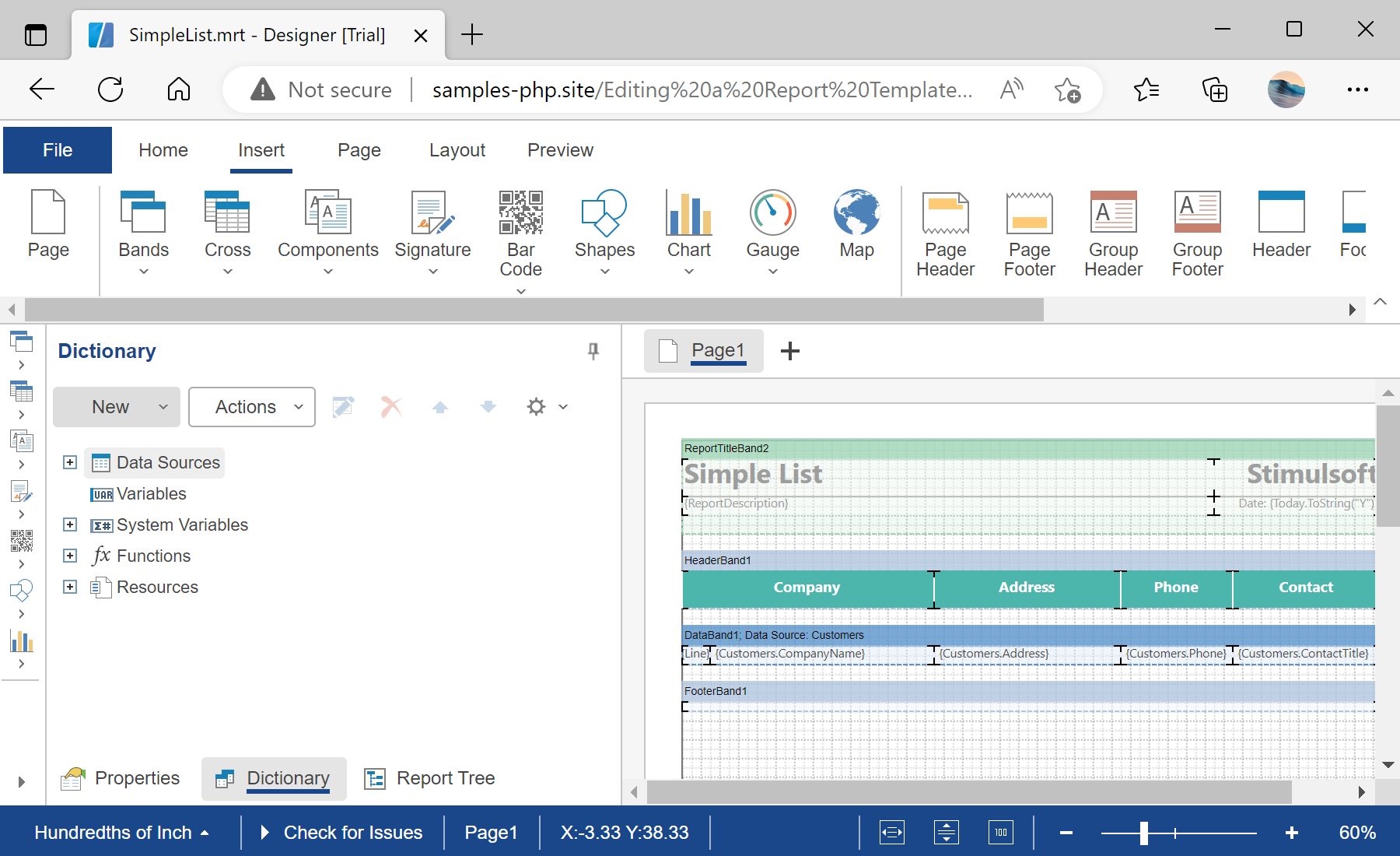
Editing a Report Template in the Designer using JavaScript

By using this website, you agree to the use of cookies for analytics and personalized content. Cookies store useful information on your computer to help us improve efficiency and usability. For more information, please read the privacy policy and cookie policy.