




















Using the Report Page Canvas for the Copyrights
Our sample projects and report templates can help you learn the basics of working with our products.This example is outdated, you can check out the many other new examples in this category.This example shows how to place a watermark on the report page. Watermark on the page can be text, the result of the expression, or an image. Also watermark can be placed anywhere on the page. In this example we will add a text watermark. For this, we use the drawing page event of the report:
The method of rendering the watermark is below:
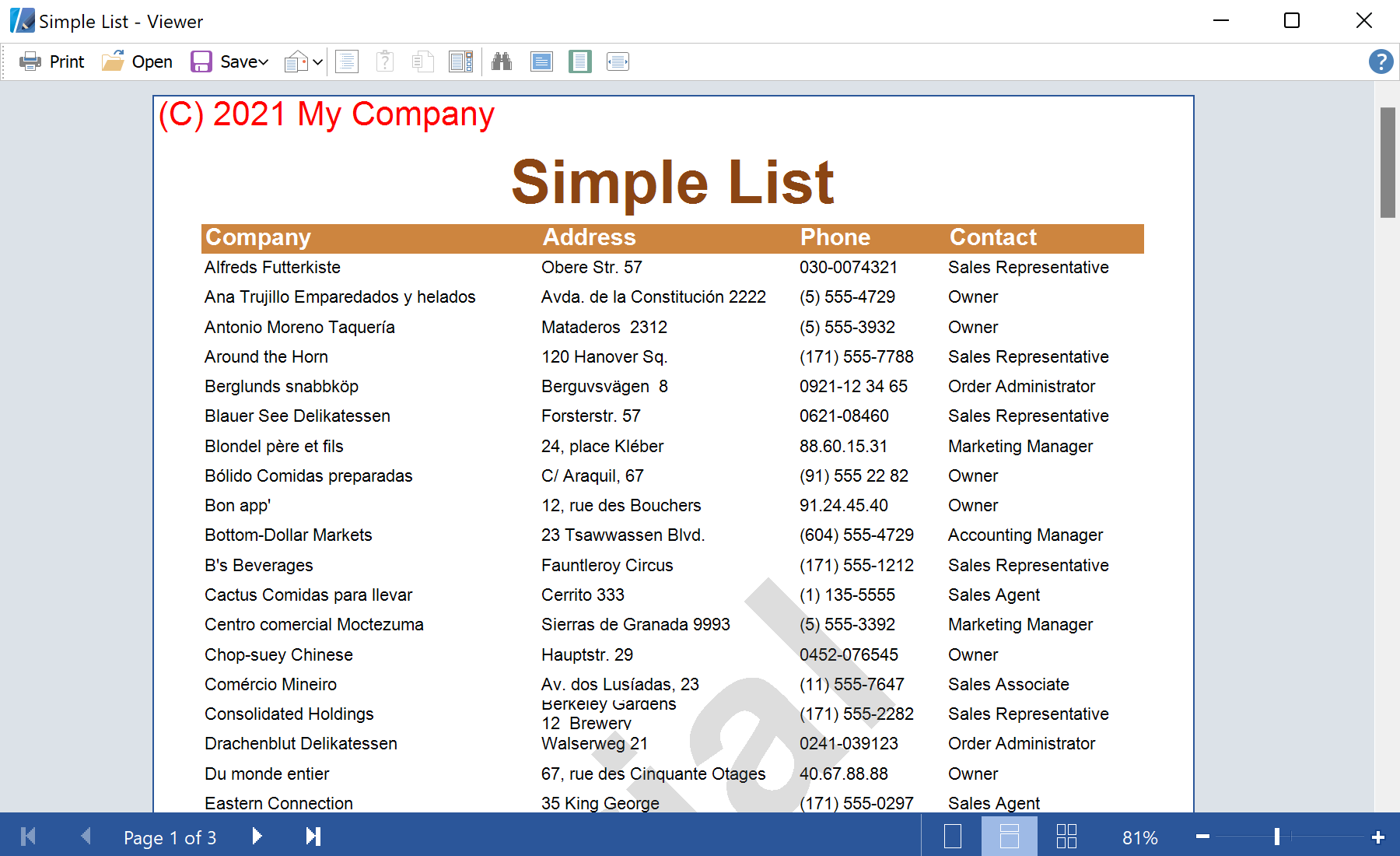
In the screenshot below you can see the result of the sample code:
static void Main()
{
	// Enable HiDPI mode
	Stimulsoft.Report.Win.StiDpiAwarenessHelper.SetPerMonitorDpiAware();

	StiPage.PagePainting += new StiPagePaintEventHandler(OnPagePainting);
	StiPage.PagePainted += new StiPagePaintEventHandler(OnPagePainted);

	Application.EnableVisualStyles();
	Application.Run(new Form1());
}

private static void OnPagePainting(StiPage sender, StiPagePaintEventArgs e)
{
	if (copyrightPosition == Position.Behind)
	{
		var page = sender as StiPage;
		DrawCopyright(page, e);
	}
}

private static void OnPagePainted(StiPage sender, StiPagePaintEventArgs e)
{
	if (copyrightPosition == Position.Front)
	{
		var page = sender as StiPage;
		DrawCopyright(page, e);
	}
}
The method of rendering the watermark is below:
private static void DrawCopyright(StiPage page, StiPagePaintEventArgs e)
{
	if (e.IsPrinting && !printer) return;
	if (e.IsDesigning && !designer) return;
	if (!e.IsDesigning && !e.IsPrinting && !preview) return;

	var rect = e.FullRectangle;
	if (rectClient) rect = e.ClientRectangle;

	using (Font font = new Font("Arial", 20 * (float)page.Zoom))
	using (StringFormat sf = new StringFormat())
	{
		switch (copyrightPlace)
		{
			case Place.TopLeft:
				sf.Alignment = StringAlignment.Near;
				sf.LineAlignment = StringAlignment.Near;
				break;

			case Place.TopRight:
				sf.Alignment = StringAlignment.Far;
				sf.LineAlignment = StringAlignment.Near;
				break;

			case Place.Center:
				sf.Alignment = StringAlignment.Center;
				sf.LineAlignment = StringAlignment.Center;
				break;

			case Place.BottomLeft:
				sf.Alignment = StringAlignment.Near;
				sf.LineAlignment = StringAlignment.Far;
				break;

			case Place.BottomRight:
				sf.Alignment = StringAlignment.Far;
				sf.LineAlignment = StringAlignment.Far;
				break;
		}

		e.Graphics.DrawString(copyrightString, font, Brushes.Red, rect, sf);
	}
}
In the screenshot below you can see the result of the sample code: