




















Showing a Report as PDF
Our sample projects and report templates can help you learn the basics of working with our products.Instead of downloading, an exported PDF can be shown inline in the browser — render the report, export to a PDF blob, and open it in a new tab.
Render, then export to a PDF blob.
How it works. The PDF is produced entirely client-side and shown from a blob URL, so no server round-trip or file download is required.
In the screenshot below you can see the result of the sample code:
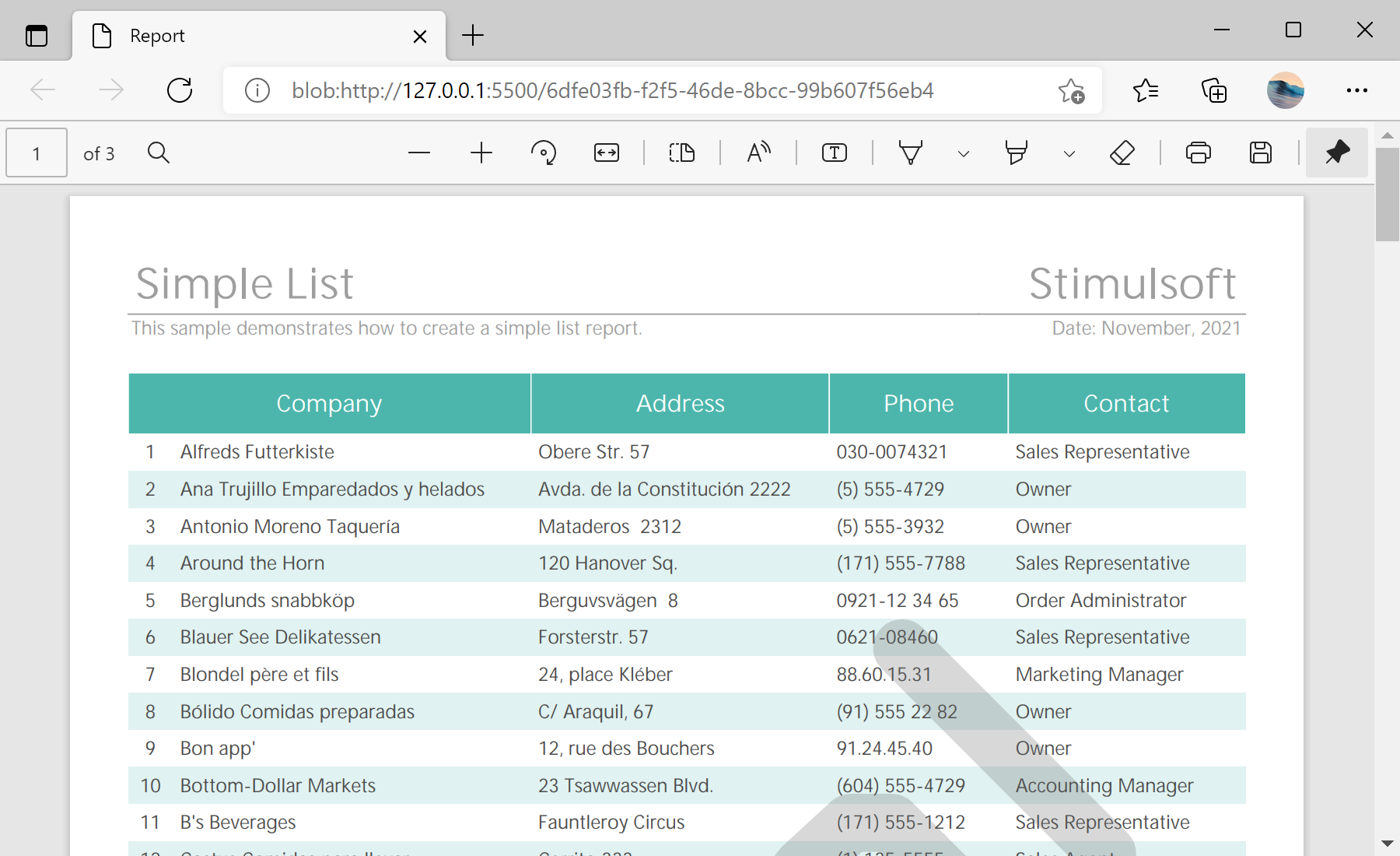
Render, then export to a PDF blob.
var report = new Stimulsoft.Report.StiReport();
report.loadFile("../reports/SimpleList.mrt");
report.renderAsync2();

function saveReportPdf() {
    report.exportDocumentAsync(function (pdfData) {
        var blob = new Blob([new Uint8Array(pdfData)], { type: "application/pdf" });
        window.open(URL.createObjectURL(blob));
    }, Stimulsoft.Report.StiExportFormat.Pdf);
}
exportDocumentAsync(callback, StiExportFormat.Pdf)— renders to PDF bytes and hands them to the callback.new Blob(...)+URL.createObjectURL— wrap the bytes as a blob and open them in a browser tab.
How it works. The PDF is produced entirely client-side and shown from a blob URL, so no server round-trip or file download is required.
In the screenshot below you can see the result of the sample code: