Cloud
Cloud-Dienstleistung für schnelle und effektive Analyse und Visualisierung von Daten für Ihr Business ohne eigene Applikationen zu erstellen oder zu programmieren.
Localization property. This can be done on the ASPX page or in the Page_Load() event:
<cc1:StiWebDesigner ID="StiWebDesigner1" runat="server" Localization="Localization/en.xml" />protected void Page_Load(object sender, EventArgs e)
{
StiWebDesigner1.Localization = "Localization/en.xml";
}Localization folder of the Web project. After selecting you can display the designer with the specified localization:
<%@ Page Language="C#" AutoEventWireup="true" CodeBehind="Default.aspx.cs" Inherits="Localizing_the_Designer.Default" %>

<!DOCTYPE html>
<html xmlns="http://www.w3.org/1999/xhtml">
<head runat="server">
	<title>Localizing the Designer</title>
</head>
<body>
	<form id="form1" runat="server">
	<div>
		<h2><span style="color: #0066ff">Localizing Designer Example</span></h2>
		<h3>This sample demonstrates how to localize the report designer</h3>
		<asp:DropDownList ID="DropDownListLang" runat="server">
			<asp:ListItem Value="ar">Arabic</asp:ListItem>
			<asp:ListItem Value="be">Belarusian</asp:ListItem>
			<asp:ListItem Value="bg">Bulgarian</asp:ListItem>
			<asp:ListItem Value="ca-ES">Catalan</asp:ListItem>
			<asp:ListItem Value="cs">Czech</asp:ListItem>
			<asp:ListItem Value="de">Deutsch</asp:ListItem>
			<asp:ListItem Value="el-GR">Greek</asp:ListItem>
			<asp:ListItem Value="en-GB">English (UK)</asp:ListItem>
			<asp:ListItem Value="en" Selected="True">English</asp:ListItem>
			<asp:ListItem Value="es">Spanish</asp:ListItem>
			<asp:ListItem Value="eu-ES">Basque</asp:ListItem>
			<asp:ListItem Value="fa">Farsi</asp:ListItem>
			<asp:ListItem Value="fr">French</asp:ListItem>
			<asp:ListItem Value="gl-ES">Galician</asp:ListItem>
			<asp:ListItem Value="hr">Croatian</asp:ListItem>
			<asp:ListItem Value="hu">Hungarian</asp:ListItem>
			<asp:ListItem Value="id">Indonesian</asp:ListItem>
			<asp:ListItem Value="it">Italian</asp:ListItem>
			<asp:ListItem Value="ka">Georgian</asp:ListItem>
			<asp:ListItem Value="Lt-sr-SP">Serbian (Latin)</asp:ListItem>
			<asp:ListItem Value="lt">Lithuanian</asp:ListItem>
			<asp:ListItem Value="nb-NO">Norwegian (Bokmål)</asp:ListItem>
			<asp:ListItem Value="nl">Dutch</asp:ListItem>
			<asp:ListItem Value="pl">Polish</asp:ListItem>
			<asp:ListItem Value="pt-BR">Portugese (Brazil)</asp:ListItem>
			<asp:ListItem Value="pt">Portuguese</asp:ListItem>
			<asp:ListItem Value="ro">Romanian</asp:ListItem>
			<asp:ListItem Value="ru">Russian</asp:ListItem>
			<asp:ListItem Value="sk">Slovak</asp:ListItem>
			<asp:ListItem Value="sv">Swedish</asp:ListItem>
			<asp:ListItem Value="tr">Turkish</asp:ListItem>
			<asp:ListItem Value="ua">Ukrainian</asp:ListItem>
			<asp:ListItem Value="zh-CHS">Chinese (Simplified)</asp:ListItem>
			<asp:ListItem Value="zh-CHT">Chinese (Traditional)</asp:ListItem>
		</asp:DropDownList>
		<asp:Button ID="ButtonShowDesigner" runat="server" Text="Show Designer" onclick="ButtonShowDesigner_Click" />
	</div>
	</form>
</body>
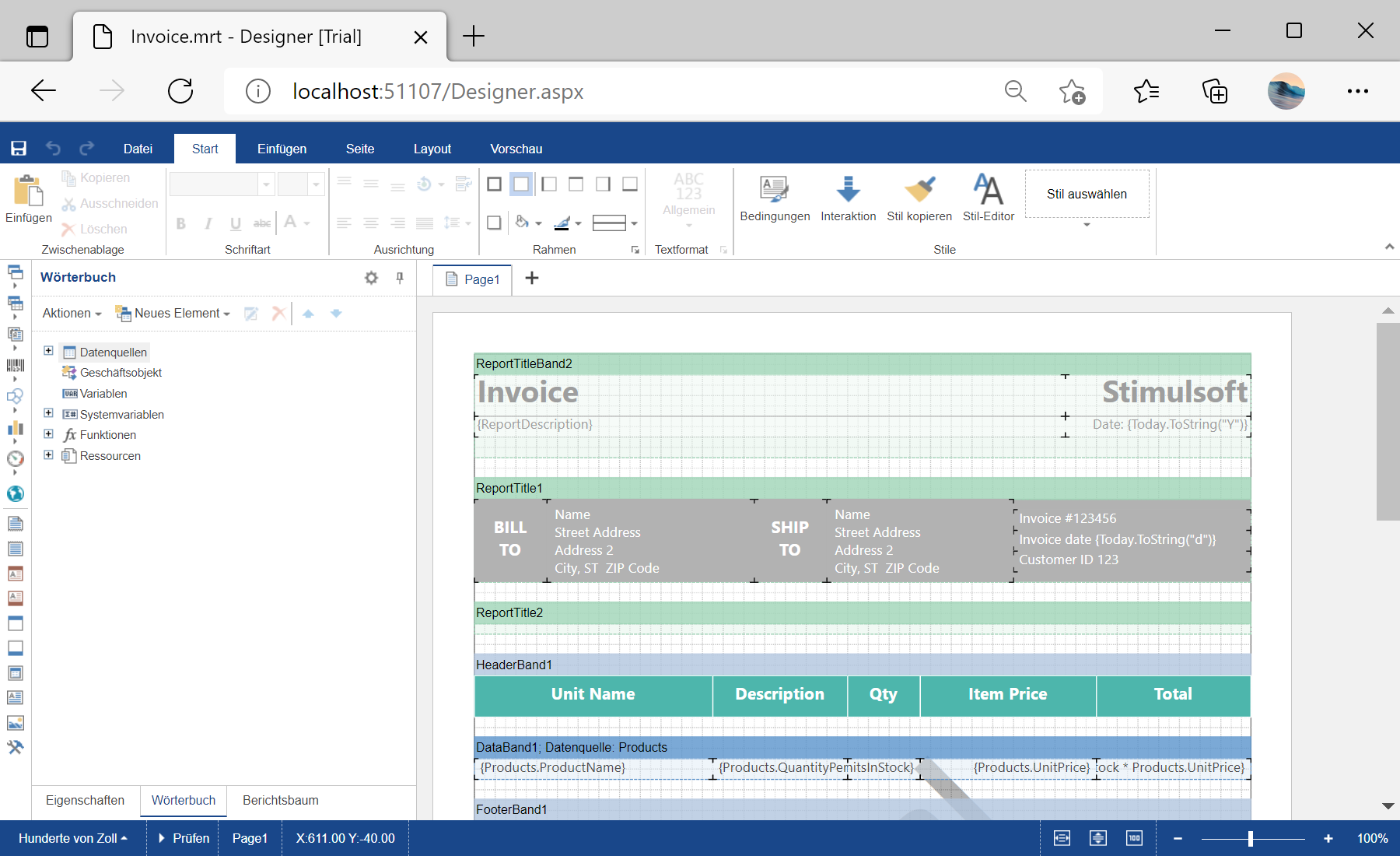
</html>ButtonShowDesigner_Click() event redirects to the Designer.aspx page. On this page, in the Page_Load() event loads the report and applies the selected localization to the HTML5 designer:
protected void Page_Load(object sender, EventArgs e)
{
	var report = new StiReport();
	report.Load(Server.MapPath(@"Reports\Invoice.mrt"));

	StiWebDesigner1.Localization = $"Localization/{Session["lang"]}.xml";
	StiWebDesigner1.Report = report;
}