






















Stimulsoft Reports.NET
Reporting tool for WinForms
Stimulsoft Reports.NET is a reporting tool created for integration and work in Windows Forms applications. Using our reporting tool, you can create, edit, view, export, and print reports of any complexity. The product includes a powerful, intuitively understandable report designer and an interactive viewer. Besides, the product contains a fully functional web viewer for the ASP.NET platform.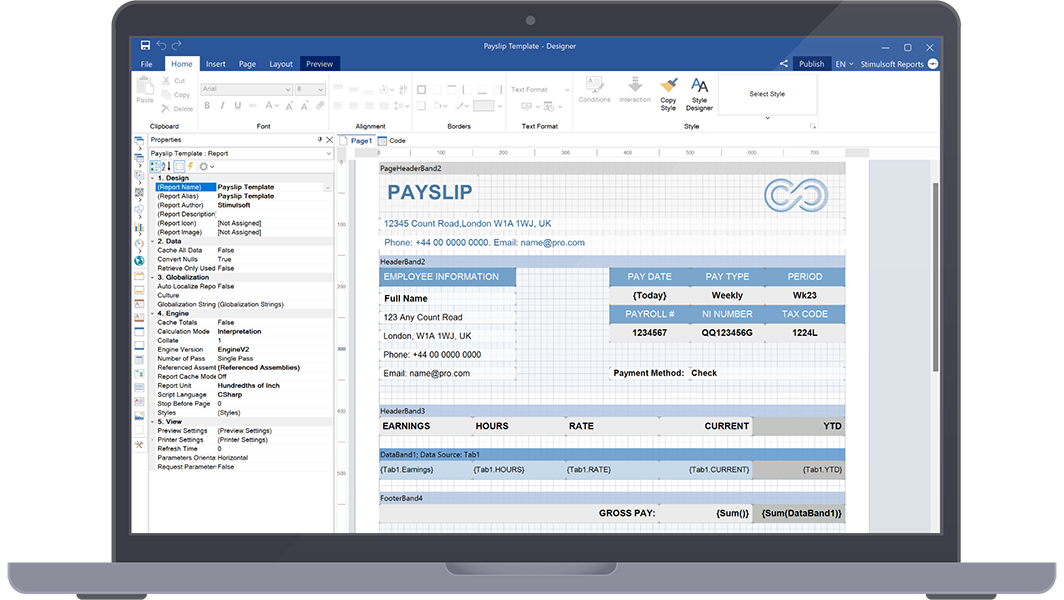
Royalty-Free Report Designer
The most important part of Stimulsoft Reports.NET is the royalty-free report designer – a component for integration and use in WinForms applications. It is very simple to use – you need only several strings of code, and your clients can start creating new reports and working with already existing ones. Besides, the component supports localization of 40+ languages and has a familiar Ribbon UI and many report wizards.- A component for integration to the projects that use the WinForms platform. It only takes a few lines of code to get started.
Show code
// Code example var report = new StiReport(); report.Design(); - An standalone report designer for work with reports on a developer’s computer that is supported for Windows, macOS and Linux.
Report Viewer
The viewer is a special component for report viewing. A report is viewed more often than created or edited, so the process is more important. On this basis, the report viewer should be fast, convenient, and fully customizable. Our component supports the work with parameters, multi-level drill-down, interactive reports, viewing and saving resources, and much more. For full integration into projects, we offer many design themes and options to customize the appearance and functionality of the application.Data for reports
Our reporting tool supports many ways to connect data to a report using both the report designer functionality and code. We offer a vast list of supported data servers – MS SQL, Firebird, MySQL, PostgreSQL, etc. We support all standard types of OData protocol. You can get data from XML, JSON, Excel, and other files.


Integration
The Stimulsoft Reports.NET reporting tool is intended for integration into WinForms projects. Using our components, you can create, edit, print, view reports in your application. Besides, any actions on a report can be performed using C#/VB.NET code, and for tighter integration, many properties and events are provided for both components and the report generator. Also, a special component for report viewing in the ASP.NET application is available in the product. WinForms
 ASP.NET
Maximum functionality
The main feature of the Stimulsoft Reports.NET report generator is that when we were developing it, we took into account the suggestions and requirements of our users. That’s why our product has become multifunctional, flexible in customization, and quick in work – such as it is wanted to be seen by an end user. For convenient and effective work, we offer:A lot of components

and different bands to mathematical formulas
and 3D Pie charts that are intended for creating
reports in the designer.
Variety of data formats

number of data sources for connection, as well
as exporting the finished document to 40+
formats.
Universal reporting tool

applications written on the WinForms platform
using the .NET Framework technology,
.NET Core and .NET.

Features
Ability to share reports

you can send it by email and share it
with subscribers and business partners
in social networks.
Useful resources

user documentation, video tutorials, a large
collection of prepared report templates and
much more.
Simple integration

the report generator start working in your
application, you should only several
strings of a code.


Variety of export formats
Work with reports does not end with their design and rendering - they should be shared with employees or sent for review to managers. Our products support export to a large number of formats. These are the popular PDF with support for signatures and encryption, universal HTML for viewing in any browser, text (TXT) for printing on dot matrix printers, and many other file and image formats. Save ready-made reports in the desired format and share them in any convenient way.Make the right choice
The report builder for WinForms and ASP.NET of Stimulsoft is a powerful and universal data visualization reporting tool that can bring your project to a new level. It has not only great functionality but also ease of use. Our product contains many features that allow you to make the right choice.
Rapidity
Rapidity of run and work of components, low system requirements.

Convenience
Convenient Ribbon UI and support of Drag & Drop in the report designer.

Formatting
Conditional formatting, change of report design by a condition.

View
Support of HiDPI for screens with high resolution (4k monitors).

Templates
Ability to place data and other resources in the report template.

Cloud
A full circle of work with reports that are stored in the Stimulsoft Cloud.

Embedding
Support of nested reports, both embedded to the template and external.

Customization
Work with custom fonts and styles.

Report Wizards
A lot of report wizards and settings of components.

AI functionality in the report designer
The report designer includes AI functionality to assist with various stages of report creation. The AI assistant is integrated into many elements, such as events, variables, conditions, and more. It can verify and correct connection strings for SQL data sources, check event script code, convert scripts written in Blockly to code, validate expressions, and much more.


Compatibility
Stimulsoft Reports.NET is the integral part of the Stimulsoft platform. Reports created in our other products will work in Stimulsoft Reports.NET and vice versa. You can create reports on a computer and continue editing them in the cloud with the help of the online designer. We have tried to ensure the compatibility of the reports, to the extent possible for a particular technology. Moreover, we offer tools for importing reports from files of other popular reporting systems into our universal internal format.
Stimulsoft Ultimate
Stimulsoft Reports.NET is part of Stimulsoft Ultimate, a comprehensive All-in-One set of products designed for working with data on all modern platforms such as .NET, ASP.NET, JavaScript, Java, PHP, Blazor, Angular, WPF, WinForms, Avalonia UI, Python, and others. With our components, you can create, print, export complex reports, analyze data using clear and colorful dashboards, and collect data from users through interactive forms.What's next?
We have prepared hundreds of reports and dashboards templates grouped by spheres of use. You can immediately use them by connecting your data or change according to your requirements. Our lessons and technical documentation will help make your work effective! Moreover, you can request the training courses from our technical specialists, subscribe to our YouTube channel to always get new videos, and receive all your answers in our online documentation.
Training courses
Are you faced with difficulties when creating reports and dashboards? This is not a problem!
Video lessons
We have prepared many video materials for the designing reports and dashboards. All tutorials are grouped by specific topics and regularly updated and supplemented.
Documentation
Our online user guides describe both the general functionality of the product and provide advice and suggestions for the report design and hints of setting components for reporting.