Variable Validation
Variable Validation - is the process of checking that a variable value matches the expected format, type, and constraints.
For example:
 The variable value must be in the range from 1 to 100;
A string must not be empty;
An email must match a specific format.
Let us consider the variable validation settings:
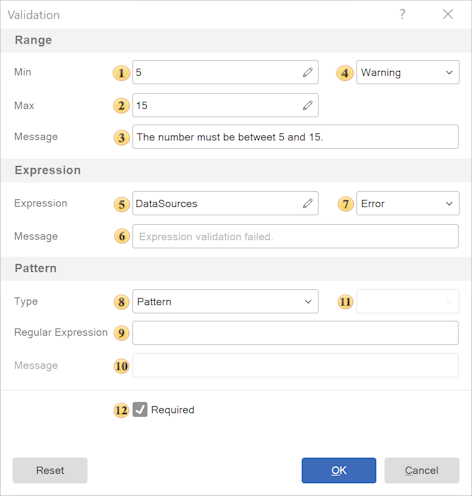
Range
Allows defining a range of valid values. The parameters of this group are listed below.
 In the Min field, the minimum allowed value is specified;
 In the Max field, the maximum allowed value is specified;
 Message - provides the ability to specify a notification that will be displayed on the parameters panel when the entered value is outside the defined range;
 Validation Type - defines the type of value validation:
Warning - in this case, a message will be displayed on the parameters panel, but the parameter value will still be applied and the report will be generated;
Error - in this case, a message will be displayed on the parameters panel, and the parameter value will not be applied and the report will not be generated.
Expression
Allows defining a validation criterion using an expression. The parameters of this group are listed below.
 In the Expression field, you can specify a condition, for example: variable_1 != 5;
 Message - provides the ability to specify a notification that will be displayed on the parameters panel when the entered value does not meet the criteria of the defined expression;
 Validation Type - defines the type of value validation:
Warning - in this case, a message will be displayed on the parameters panel, but the parameter value will still be applied and the report will be generated;
Error - in this case, a message will be displayed on the parameters panel, and the parameter value will not be applied and the report will not be generated.
Pattern
Allows you to validate the result of the evaluated expression. The parameters of this group are described below.
 Type. The following options are available:
No - pattern validation is disabled;
Pattern - custom regular expression;
Email - email validation;
Phone - phone number;
URL - web address;
Alpha Numeric - letters and digits;
Alpha - letters only;
Numeric - digits only;
SSN - Social Security Number (USA);
TIN - Tax Identification Number;
IP Address - IP address;
IBAN - International Bank Account Number;
ISBN - International Standard Book Number.
 Regular Expression - in this field, a custom regular expression is specified, which is used to validate the entered value. The value is considered valid if it matches the specified pattern. A regular expression allows defining complex validation rules, for example:
validation of an e-mail format;
validation of a phone number;
validation of a string according to a specified pattern.
If the entered value does not match the regular expression, a validation message will be displayed.
 Message - provides the ability to specify a notification that will be displayed on the parameters panel when the entered value does not meet the criteria of the defined pattern;
 Validation Type - defines the type of value validation:
Warning - in this case, a message will be displayed on the parameters panel, but the parameter value will still be applied and the report will be generated;
Error - in this case, a message will be displayed on the parameters panel, and the parameter value will not be applied and the report will not be generated.
 Required - makes the field mandatory, an empty value will be treated as an error.
Information |
Validation is performed sequentially: Range → Expression → Pattern → Required. If the value does not meet one of the criteria, validation stops and an error message is displayed for that criterion. Validation can be performed using a single criterion (for example, Range) or multiple criteria simultaneously (for example, Range and Expression).
|